模板简介
模板使用说明(必读)
主题配色问题
关于V5模板中的CSS变量
首页修改地址后刷新不变的问题
顶部导航对应侧边栏菜单切换
侧边栏菜单的JS初始化
iframe子页面刷新问题
iframe版本右侧内容区域404问题
关于非iframe版本菜单高亮
iframe版本的Tab插件相关问题
关于iframe版本里面的加载动画
webuploader使用时候的问题
模板字体图标问题
关于版权和商业用途
模板中固有插件
1
bootstrap-colorpicker颜色选择
2
bootstrap-datepicker日期选择
3
bootstrap-datetimepicker日期时间
4
bootstrap-maxlength长度验证
5
bootstrap-select下拉选择
6
bootstrap-table表格插件
7
fullcalendar日程插件
8
jquery-confirm对话框
9
jquery-tagsinput标签插件
10
magnific-popup图片查看
11
webuploader上传插件
12
bootstrap-notify消息插件
13
chartjs图表插件
14
bootstrap.wizard向导插件
15
perfect-scrollbar滚动条插件
16
bootstrap-multitabs多标签
17
moment.js日期处理类
18
loading插件
19
popper插件
插件项目包含插件
1
bootstrap-daterangepicker
2
material-datetimepicker
3
dropzone上传
4
cropper图片裁剪
5
ckeditor富文本编辑器
6
editor.md编辑器
7
summernote富文本编辑器
8
tinymce富文本编辑器
9
ueditor富文本编辑器
10
wangeditor富文本编辑器
11
jquery-validate表单验证
12
bootstrap-selectN联动
13
bootstrap-lyear-select下拉
14
select2下拉选择框
15
lyear-dropdowntree下拉树状
16
ZTree树形菜单
17
treeview树状插件
18
jstree树状结构
19
imgVer拼图滑块
20
sliderVerification滑块验证
21
layer弹窗插件
22
jquery.auto.complete自动填充
23
fixedheadertable固定表头
24
fontIconPicker图标选择
25
jQuery Raty评分插件
26
jquery.toolbar弹出式工具栏
27
bootstrap-touchspin输入微调器
插件项目包含示例
1
表单布局示例
2
聊天页面示例
3
logo处使用文字
4
模态框中使用Tab
5
模态框最大化
6
搜索布局
7
搜索布局2
8
选择示例
9
选择示例2
10
选择示例3
11
选择示例4
12
代码演示切换
13
留言列表布局
14
布局(数据统计篇)
15
布局(产品价格篇)
16
布局(搜索框篇)
17
布局(用户篇)
18
布局(动画篇)
19
布局(其他篇)
20
另一种侧边栏菜单
21
顶部和左侧联动
22
JS初始化菜单
23
H5上传
fixedheadertable固定表头 - 光年模板(V5)说明文档 - 笔下光年
网站首页
fixedheadertable固定表头
这里整合的版本是1.3。 官网地址:http://www.fixedheadertable.com/ 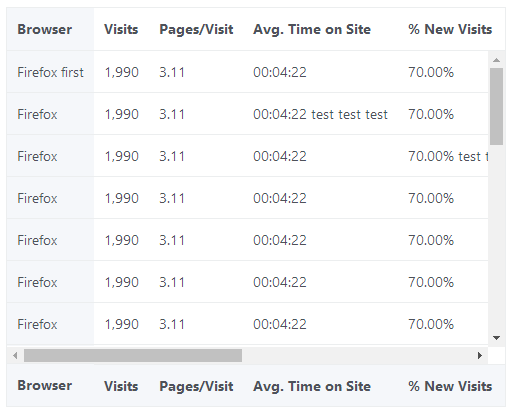 为了契合光年模板,做了css的调整,如下: ```css /* @group Reset */ .fht-table, .fht-table thead, .fht-table tfoot, .fht-table tbody, .fht-table tr, .fht-table th, .fht-table td { /* position */ margin: 0; /* size */ padding: 0; /* text */ font-size: 100%; vertical-align: top; } .fht-table { /* appearance */ border-collapse: collapse; border-spacing: 0; } /* @end */ /* @group Content */ .fht-table-wrapper, .fht-table-wrapper .fht-thead, .fht-table-wrapper .fht-tfoot, .fht-table-wrapper .fht-fixed-column .fht-tbody, .fht-table-wrapper .fht-fixed-body .fht-tbody, .fht-table-wrapper .fht-tbody { /* appearance */ overflow: hidden; /* position */ position: relative; } .fht-table-wrapper .fht-fixed-body .fht-tbody, .fht-table-wrapper .fht-tbody { /* appearance */ overflow: auto; } .fht-table-wrapper .fht-table .fht-cell { /* appearance */ overflow: hidden; /* size */ height: 1px; } .fht-table-wrapper .fht-fixed-column, .fht-table-wrapper .fht-fixed-body { /* position */ top: 0; left: 0; position: absolute; } .fht-table-wrapper .fht-fixed-column { /* position */ z-index: 1; } /* @end */ /*增加样式*/ .fht-thead .fht-table thead > tr > th, .fht-tbody .fht-table thead > tr > th, .fht-tfoot .fht-table thead > tr > th { border-width: 1px!important; } .fht-fixed-column .fht-thead, .fht-fixed-column .fht-tbody, .fht-tfoot { background-color: #f5f7fa; } .fht-tbody .table-bordered { border-top: 0px; } .fht-tfoot .fht-table { /*margin-top: -1px;*/ } .fht-tfoot .fht-table th, .fht-tfoot .fht-table td { border-top: 1px solid #eceeef!important; } .h-250 { height: 250px; overflow: hidden; } .h-400 { height: 400px; overflow: hidden; } .w-500 { width: 500px; overflow: hidden; } /* 强制不换行 */ .table-nowrap th, .table-nowrap td { white-space: nowrap; } ``` 其中 `h-250` `h-400` `w-500` 是为了演示示例中能出现纵向和横向滚动条而使用的。 插件项目中页面名字:`lyear_js_fixedheadertable.html` 演示地址:http://lyear.itshubao.com/v5/example/ 涉及的文件: - `js/jquery.fixedheadertable.js`
上一篇:
jquery.auto.complete自动填充
下一篇:
fontIconPicker图标选择
阅读设置
字体大小
小号 (14px)
标准 (16px)
大号 (18px)
超大 (20px)
特大 (24px)
阅读主题
默认
护眼模式
夜间模式
古卷模式
恢复默认
确定