bootstrap-datepicker日期(v3)
v3版本对应使用插件是Bootstrap-datepicker 1.6.1。
v3和v4的模板中,因为初始化的js写法不一样,所以在v3和v4的使用上有些许不同,按照模板中的示例写就行了。
github地址:https://github.com/uxsolutions/bootstrap-datepicker
文档地址:https://bootstrap-datepicker.readthedocs.io/en/latest/
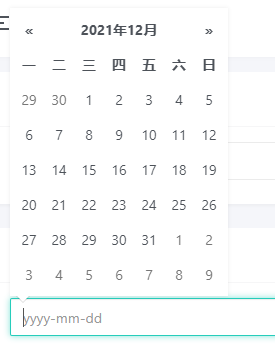 给input增加
 js-datepicker 的class即可,另外你可以使用 data-date-format="yyyy-mm-dd" 来指定选取的日期格式化规则。
<input class="form-control js-datepicker m-b-10" type="text" id="example-datepicker" name="example-datepicker" placeholder="yyyy-mm-dd" value="" data-date-format="yyyy-mm-dd" />
<input class="form-control js-datepicker m-b-10" type="text" id="example-datepicker1" name="example-datepicker1" data-date-format="yyyy/mm/dd" placeholder="yyyy/mm/dd">
<input class="form-control js-datepicker m-b-10" type="text" id="example-datepicker2" name="example-datepicker2" data-date-format="yy/mm/dd" placeholder="yy/mm/dd"> 当然你还可以制定日期范围的选取,将
 js-datepicker 和其他的配置参数放置在 input-group 上即可。
<div class="input-daterange input-group js-datepicker" data-auto-close="false" data-date-format="yyyy-mm-dd">
  <input class="form-control" type="text" id="example-daterange1" name="example-daterange1" placeholder="从">
  <span class="input-group-addon"><i class="mdi mdi-chevron-right"></i></span>
  <input class="form-control" type="text" id="example-daterange2" name="example-daterange2" placeholder="至">
</div>
模板中还有单独选择年份和单独选择月份的示例(js是单独初始化的)。
涉及的文件:
lyear_js_datepicker.htmljs/bootstrap-datepicker/bootstrap-datepicker3.min.cssjs/bootstrap-datepicker/bootstrap-datepicker.min.jsjs/bootstrap-datepicker/locales/bootstrap-datepicker.zh-CN.min.js